e2log4.0.24
Publisher Description
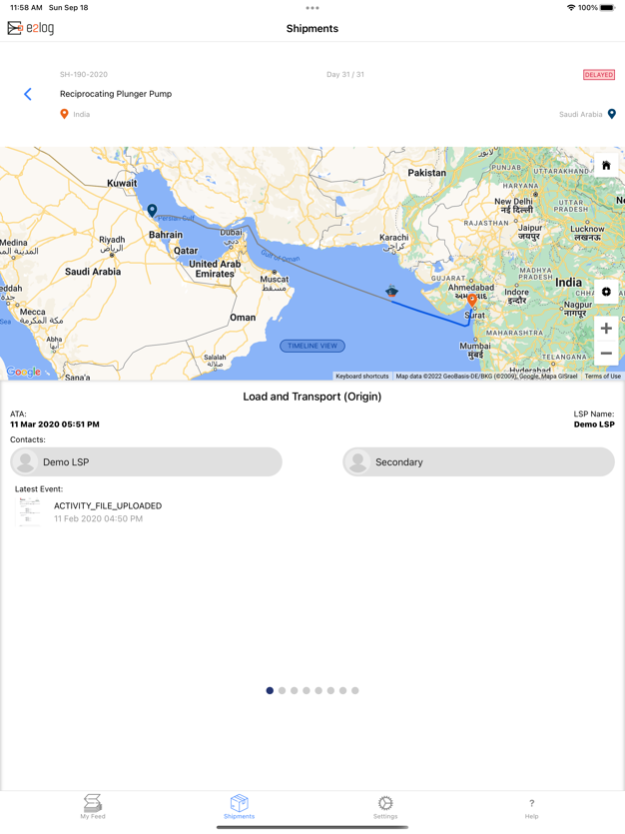
Use e2log Mobile to help you track and trace your high value cargo and shipments, maintaining visibility throughout the entire shipping process, and keeping up with important documents. The days of keeping track of emails or calling multiple people to get crucial shipment information is behind us. Keep the power of information in your mobile device wherever you need it, when you need it.
Features include:
- Push notifications for shipment milestones
- Immediate access to recent shipment activity
- Shipment summary information including status, origin and destination, completion rate, current activity, mode of transportation, and estimated time of arrival
- Key milestones with map locations, route plan, and date time stamps
- Shipment timeline with completed and future milestones
- Videos, images, engineering drawings, catalogs, etc. can be uploaded and viewed by all relevant parties
- Quick contact to call your Logistic Service Providers currently handling your shipment
- Tracks driver location using background geolocation tracking to provide real-time location updates
e2log is a powerful next generation Global Logistics Orchestration Platform. Find out more about us at https://e2log.com
Sep 7, 2023
Version 4.0.24
- Improved background location tracking capabilities for LSP driver users
- Bug fixes and stability/performance improvements
About e2log
The company that develops e2log is e2log. The latest version released by its developer is 4.0.24.
To install e2log on your iOS device, just click the green Continue To App button above to start the installation process. The app is listed on our website since 2023-09-07 and was downloaded 3 times. We have already checked if the download link is safe, however for your own protection we recommend that you scan the downloaded app with your antivirus. Your antivirus may detect the e2log as malware if the download link is broken.
How to install e2log on your iOS device:
- Click on the Continue To App button on our website. This will redirect you to the App Store.
- Once the e2log is shown in the iTunes listing of your iOS device, you can start its download and installation. Tap on the GET button to the right of the app to start downloading it.
- If you are not logged-in the iOS appstore app, you'll be prompted for your your Apple ID and/or password.
- After e2log is downloaded, you'll see an INSTALL button to the right. Tap on it to start the actual installation of the iOS app.
- Once installation is finished you can tap on the OPEN button to start it. Its icon will also be added to your device home screen.
Program Details
System requirements
Download information
Pricing
Version History
version 4.0.24
posted on 2023-09-07
Sep 7, 2023
Version 4.0.24
- Improved background location tracking capabilities for LSP driver users
- Bug fixes and stability/performance improvements
version 3.4.6
posted on 2022-12-01
Dec 1, 2022
Version 3.4.6
Background geolocation improvements and other bug fixes
